OneKey® MLS EULA ensures a clear understanding of usage terms. All MLS users are required to review and complete this new agreement by the deadline, which details the rights, limitations, and responsibilities of both OneKey® MLS LLC and its Participants/Subscribers.
Upon joining the OneKey MLS, you will encounter either a Participant or Subscriber EULA tailored to your specific MLS member type. OneKey® MLS updates its EULA annually to maintain accuracy and reflect any changes.
To Sign the OneKey® MLS EULA:
1. Check your email for a message from OneKey® MLS with the subject line: "OneKey MLS Action Required: Complete EULA." Open the email and click the link labeled Review and Complete EULA. (or use this link to access the EULA)
2. This will direct you to the login page. Log in using your Login ID and password.
3. You will be taken to the Your Documents page. In the Required section, click the button labeled Review & Complete.
4. Depending on your member type, you will see either a Subscriber Agreement or a Participant Agreement. Read through, scroll down, and select all required options.
NOTE: You will have the option to view and print the document before signing.
For Subscribers:
Scroll through the document, read it carefully,
Select the I Agree checkbox, and click Submit.
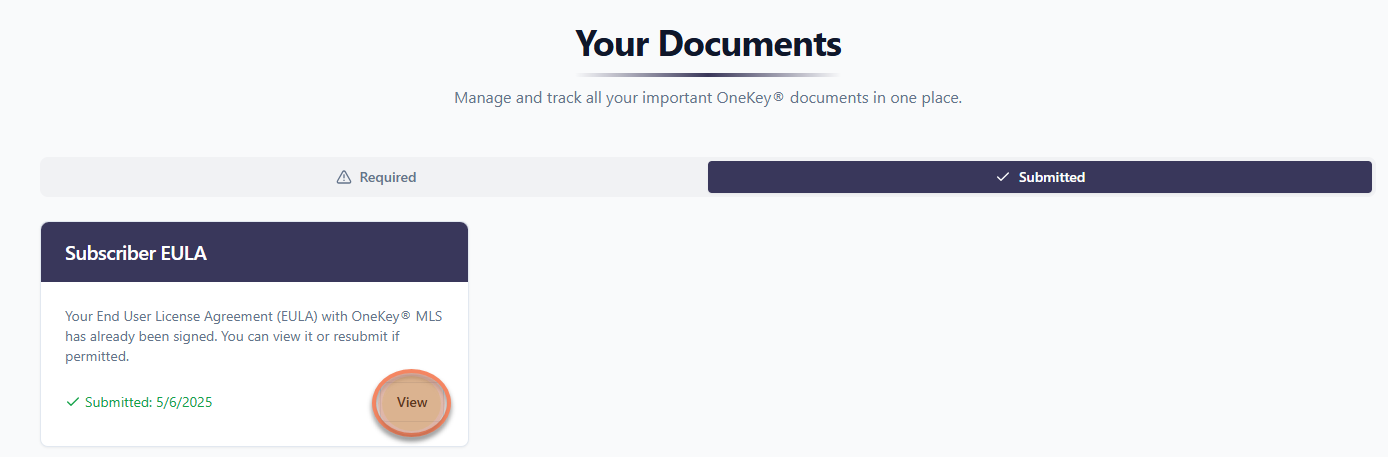
Your agreement has been submitted and is now available for viewing and printing in the Submitted section of Your Documents.
For Participants:
Scroll through the document, read it carefully,
Select Option 1 or Option 2, select the I Agree checkbox, and click Submit.
Your agreement has been submitted and is now available for viewing and printing in the Submitted section of Your Documents. To update your options, click Resubmit, and follow the instructions in the section above.
5. Once your document shows in the Submitted section, the EULA signing process is complete. You may close this browser window/tab.